

What Is a Workflow Engine? Stop Chasing Approvals by Hand
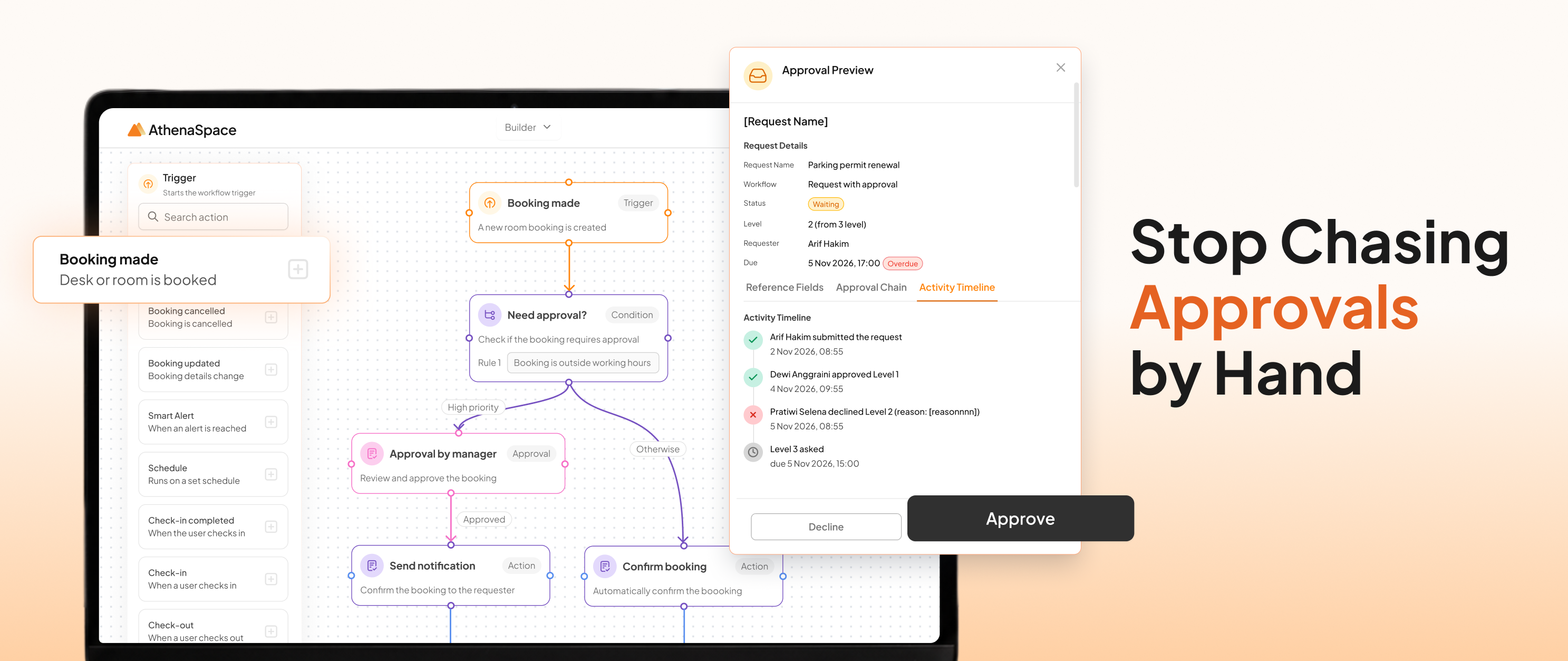
A contractor needs a site pass for Tuesday. The host emails you, you email security, and by Monday you're writing the second reminder. You haven't dropped the ball. The process depends on someone remembering to chase, and that someone is usually YOU.
A workflow engine takes that chasing off your hands: a trigger starts the process and carries the request to a decision, with no one nudging it. AthenaSpace Workflow Engine, part of the AthenaSpace space management platform, lets you build one yourself on a visual canvas, with no code and no ticket to IT. The payoff: you get your time back, requesters get an answer without asking, and nothing slips through.
What is a workflow engine?
A workflow engine keeps work moving without someone chasing every step. When a booking, request, or record change triggers a workflow, it follows the rules you've set to check details, route approvals, and take action. Every step is recorded, so you always know what happened.
What are the benefits of a workflow engine?
A workflow engine stops requests stalling in inboxes, gives you your time back from chasing, and keeps every decision on record. Here is what changes day to day.
What does no-code mean for an admin?
You know your processes best. With AthenaSpace, you can automate them without coding or waiting on IT. Workplace Global Admins and Signage Global Admins build and run workflows, while Site Admins and colleagues join in through forms, approvals and notifications. Here is what that looks like in practice:
How does a workflow engine work?
A workflow engine works in four stages: a trigger starts the run, forms collect what is missing, conditions route each case, and approvals and actions finish the job. You drag blocks onto a visual canvas, connect them and test before going live. Don't feel like starting from scratch? Just pick a ready-made template and go from there.
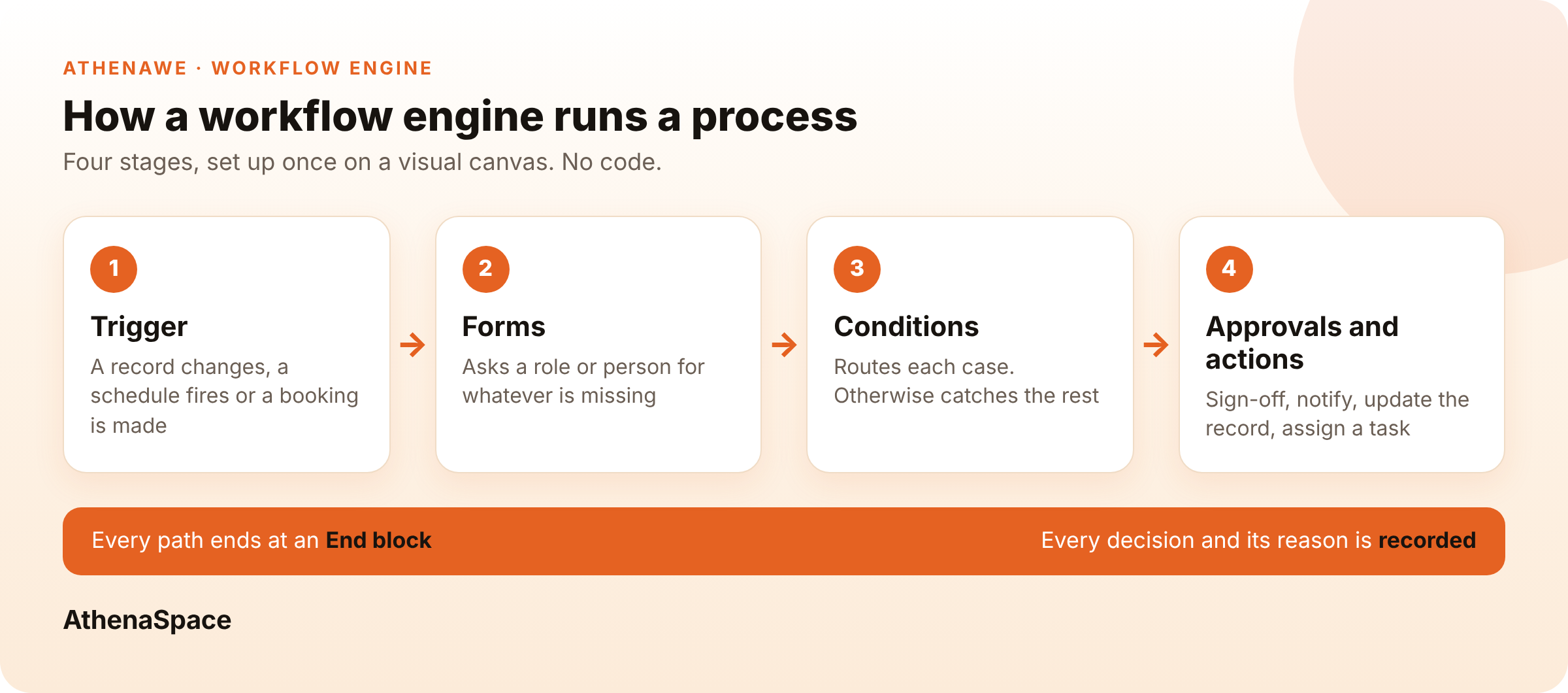
A trigger starts the run
You never have to remember to start anything. A trigger is the event that kicks things off: a record created, changed or deleted, a schedule, a Smart Alert reaching its threshold, or an event such as a booking or a visitor check-in.
Forms collect what is missing
You don’t have to chase anyone for missing details. When something is missing, the workflow handles the follow-up: it pauses and asks the right person, whether that’s a role, named people or the person who made the booking. Those forms are custom objects built in Object Manager, so every response is saved as a record that follows the fields and rules you’ve set.
Conditions route each case
Nothing falls through a gap. Conditions send each case the right way. Pathways are checked in order, the first match wins, and an Otherwise pathway catches everything else.
Approvals and actions finish the job
Decisions and follow-up happen without a nudge from you. A workflow can wait for sign-off, notify people, update records, assign tasks, or allow, deny or limit a booking. Every path ends at an End block, so there is always a clear last step.
Worked example: a contractor pass, from five emails to one workflow
This example is illustrative. It follows a Request with approval template and uses a Contractor Pass custom object built in Object Manager. You set it up once:
- Choose the form. Pick the Contractor Pass object.
- Choose the approvers. A role or named people, and how many must agree.
- Set a response window. Decide what happens when nobody answers in time.
- Test, then publish.
After that, every request runs itself:
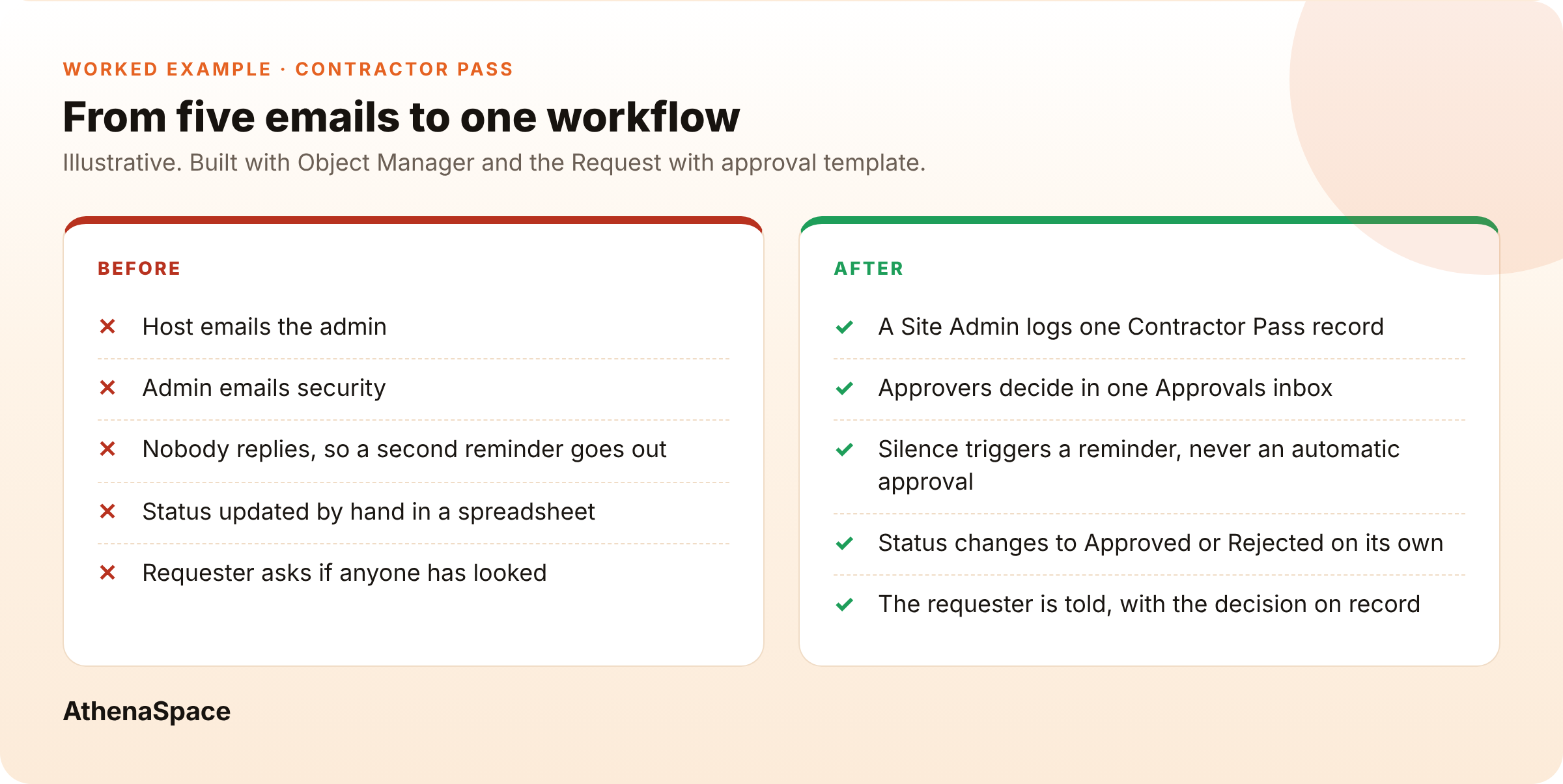
- A request is logged. A Site Admin logs it as a Contractor Pass record, which starts the run.
- A role signs off. Approvers get the request in the Approvals inbox and a notification. A requester never approves their own request.
- Silence gets a reminder. If nobody answers within the window, approvers are reminded. Nothing is ever approved automatically.
- The record updates itself. Its status changes to Approved or Rejected, without manual edits.
- The requester is told. The outcome goes to the person who created the record, and every decision and its reason is recorded.
Before: five emails, a spreadsheet and a second reminder. After: one record, one Approvals inbox and an outcome that reaches the requester on its own. The host never asks whether anyone has looked at it, and you never have to send that second reminder.
A second example: cleaning dispatched when a meeting ends
When a meeting ends and the room is checked out, a Check-out trigger starts a run. The workflow creates a cleaning task for the facilities team and notifies them, so the room is ready for the next booking without you having to ask. The task is saved as a record in an Object Manager object you choose, so cleaning is tracked like everything else.
Where should an admin start?
You don't have to automate everything at once. Start with the process that costs you the most chasing, not the most complicated one.
- List every request that needs sign-off.
- Tally how often you chase each one in a typical week.
- Pick the one with the most chasing and the clearest approvers.
- Build it, test it, then publish.
Five questions to answer before you open the canvas
- Which process repeats? Start with something that happens every week.
- Who decides? Name the role or people, and how many must agree.
- What changes when they decide? Choose the record to update and the status it moves to.
- What counts as an exception? These are the cases where a person steps in, so they need a path.
- Who needs to be told? The requester, the approver and anyone downstream, such as security or a site team.
What else can a workflow engine streamline in a space?
A workflow engine also takes routine decisions off your plate, whether you run a corporate office, a hospital, a campus or a store.
- Alerts: hear about a problem when it crosses your limit, not after the fact. A Smart Alert counts linked records against a limit you choose, such as open maintenance reports against a parking area, and the right people hear at once. Reminders then follow as a daily or weekly digest, not a stream of messages.
- Booking decisions: keep rooms available for the people who need them. A workflow can allow a booking, deny it, limit its length or release a room, and a denied booking tells the person who made it why.
Examples by setting
- Corporate offices: send catering requests for approval before they are confirmed, and tell security when a contractor pass is issued.
- Healthcare: route a reported issue by priority. High-priority issues alert site admins at once, and the rest become tasks.
- Education: tell the host when a visitor arrives, and cap the length of long room bookings so more people get a turn.
- Retail: turn a Smart Alert into a task when open maintenance reports at a store reach your limit.
Note: These are illustrations of what teams can build, not descriptions of specific customers.
Workflow or simple rule: which do you need?
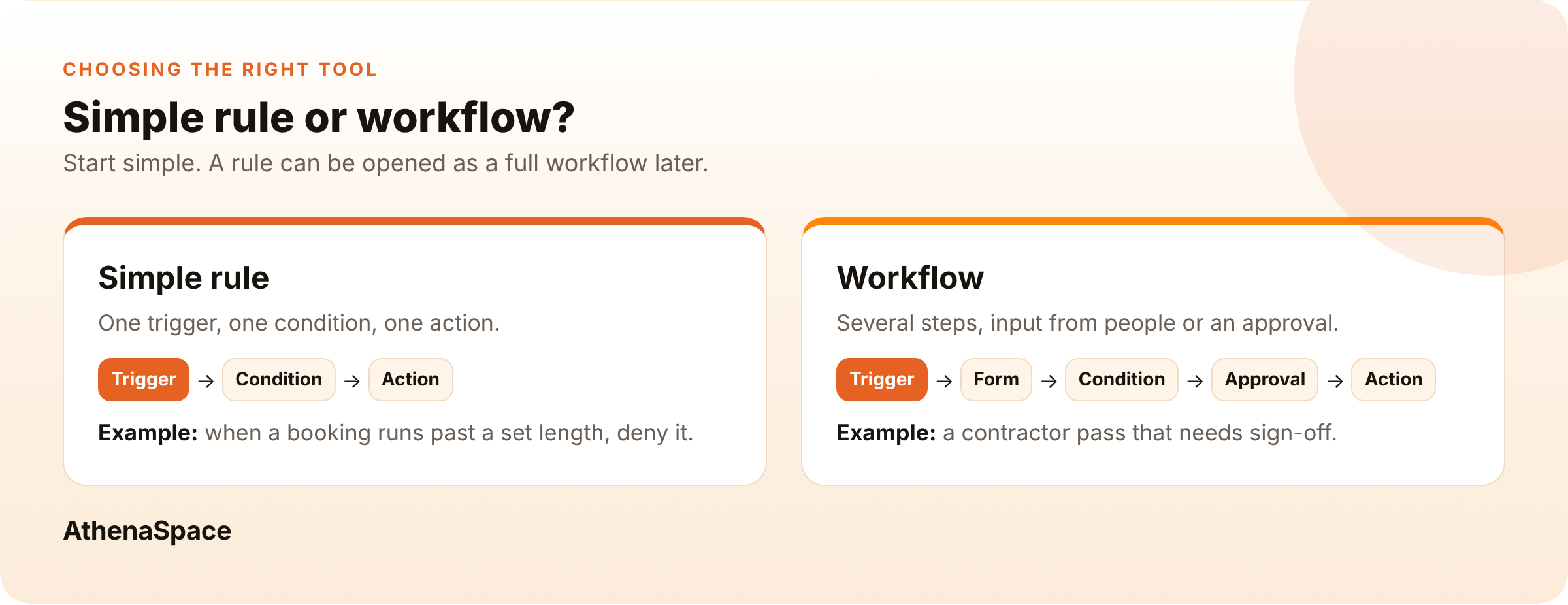
Use a simple rule when one trigger leads to one condition and one action, such as "when a booking runs past a set length, deny it". Use a workflow when the process has several steps, needs information from people or needs an approval. A rule can apply to every Site or to chosen Sites, and you can open it as a full workflow later if the policy grows.
How to test a workflow before it goes live
You test a workflow by simulating it with values you choose, with no developer needed. The test traces every path and you pick each approval outcome by hand. No record is updated, no notification is sent and no booking is touched, so you can try the awkward cases without worrying about breaking anything. After publishing, the Activity view shows each run and its path, and the Audit view shows who created, edited, published or paused a workflow.
Frequently asked questions
What are the benefits of a workflow engine?
A workflow engine stops requests stalling in inboxes, gives admins their time back from chasing, routes every case so nothing slips through, and records every decision. Admins build it with no code, so a process can be fixed without waiting on IT.
Can an admin build a workflow without IT or a developer?
Yes. Workplace Global Admins and Signage Global Admins build workflows by dragging blocks onto a canvas and connecting them, or by starting from a ready-made template. No code is involved and no ticket needs raising with IT. Other colleagues take part through forms, approvals and notifications.
How do you automate contractor pass approvals?
Build a Contractor Pass custom object in Object Manager, then start from the Request with approval template. When someone logs a pass, the workflow sends it to the approvers you choose, reminds them if nobody answers, updates the status and tells the requester. Nobody has to chase.
How does an approval workflow work?
A request goes to one or more approvers, chosen by role or by name. You decide how many must agree and set a response window. Approvers are reminded if nobody answers in time, approval is never given automatically, and every decision and its reason is recorded.
Can you test a workflow before it goes live?
Yes. A test run simulates the workflow with values you choose, so no record is updated and no notification is sent. You can try every path, including each approval outcome, before you publish.
What is workflow automation in the workplace?
It is routine follow-up, such as approvals, alerts and booking decisions, running on its own. A trigger starts each run and the workflow carries it to a decision, so people only handle the exceptions and nobody has to chase.
How does Workflow Engine work with Object Manager?
Object Manager stores the data and Workflow Engine acts on it. Every form in a workflow is an Object Manager object, and a workflow can start when a record is created or changed, then update that record, notify people or ask for approval.
Let the workflow do the chasing
You get your time back, requesters get an answer without asking, and nothing slips through. Every space runs differently, so your workflows should follow your own rules instead of workarounds. Bring your space to life using your own rules.
Request a demo and we'll walk you through a workflow built around your own approvals, alerts and bookings, or talk to a partner near you.
New to the forms behind a workflow? Read Custom Objects Explained.
See what your spaces are capable of.
Your building is already telling you what's wrong.
AthenaSpace gives you the intelligence layer to hear it — and act on it.